
How to File an Income Tax Return in Pakistan (Step-by-Step Guide 2026)
If you are a salaried individual or small business owner and are worried about how to file an income tax return, we are here to help you. In this guide, we’ll go through the whole process of how to file an income tax return on the IRIS website in 2026. At first, we’ll be going through the list of individuals who are obligated to file an income tax return.
- Individuals earning above the taxable limit
- Businessmen earning from trade and services
- Individuals who own rental properties
- Individuals who own registered vehicles and land
- Individuals whose income tax is deducted at source
Filing a proper income tax return every year makes you a filer. Being a filer gives you several advantages, such as lower tax rates on banking, property, and reduced withholding tax on investments.

Documents Required for an Income Tax Return in Pakistan
First of all, to file an income tax return, you will need to gather the required documents. Having these documents ready makes the process of filing the tax return smooth and easy.
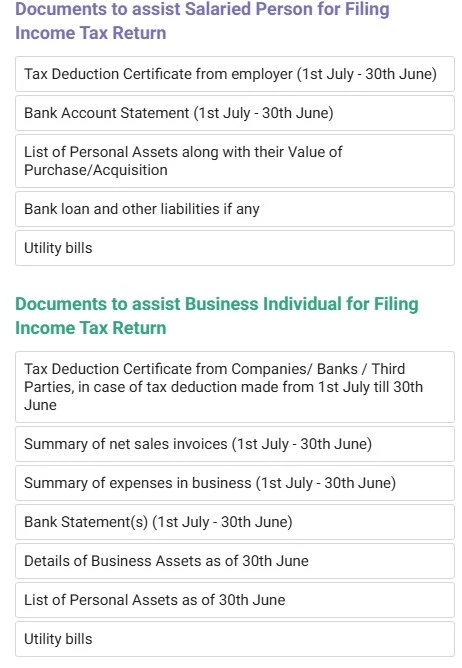
The following documents are required, depending on your income type:
- Tax Deduction Certificate
- Property and Assets Details
- Expenses Details
- Income Proof Documents
Make sure you have all the necessary documents and financial data of income and expenses, as these will be required during the filing process. The following figure shows some documents and data that will be helpful.
How to file an income tax return using the IRIS Portal
Do you want to know how to file an income tax return? Using the IRIS website is the easiest way to file an income tax return in Pakistan. IRIS is the official website of the FBR where you register, log in, and submit your return. You can file an income tax return on IRIS with ease by following the steps given below.
Step 1: Access the Iris web portal
- Go to the IRIS FBR main web portal to access it for filing your income tax return.
- Type the Iris FBR official web address in your web browser, such as Chrome, Internet Explorer, Safari, or others. Enter https://iris.fbr.gov.pk/ in your web browser. The portal will open as shown in the image below.
Note: For optimal compatibility, we recommend using the Chrome browser.

Step 2: Enter the user name and password to log in
Once the portal is open, a window will be displayed as shown in the previous image.
- You need to enter your username and password and click on login.
- Once you enter your login credentials, the following windows will appear on your screen.
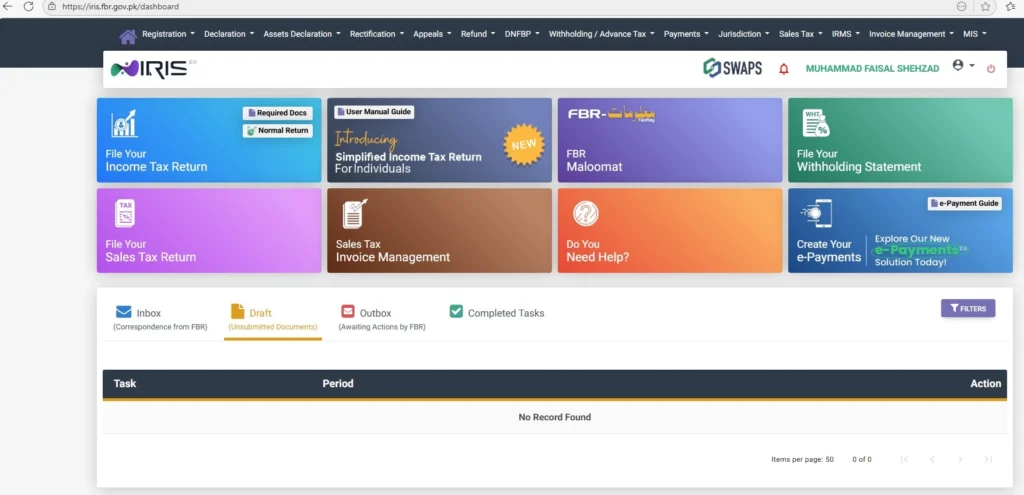
Note: If you are not already registered on the Iris FBR portal and don’t have the login credentials, you need not worry. You can follow our guide on “How to register for the FBR portal” to complete the registration process.
Step 3: File your income Tax return
- Click on the second field at the top, “Declaration”, and then select “Returns/Statements (Original)”.
- Then click on 1st option for filing a simplified tax return as a salaried person, as shown in the image below.
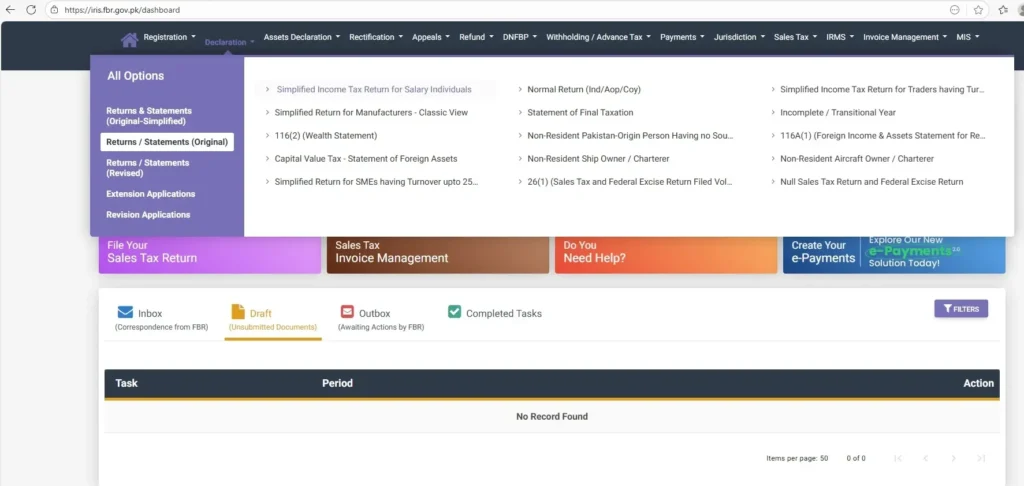
Note: The persons having other sources of income and business individuals need to select the “Normal Return option”.
Step 4: Select the Fiscal year
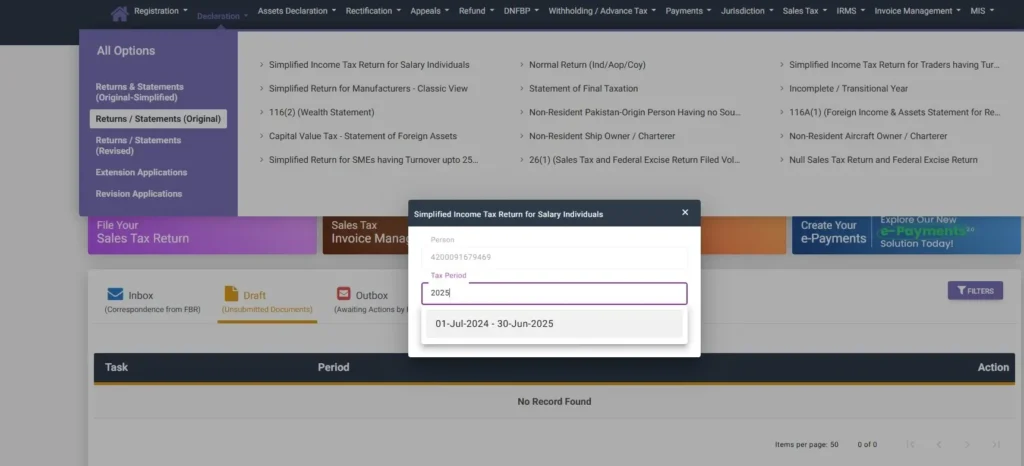
- Select the financial year for which the tax file is to be returned.
- If you are to file for the current FY-2026, select 2026, which is from 1-July-2025 to 30-June-2026, as shown in the screenshot.
Step 5: Switch to Regular Normal Classic View
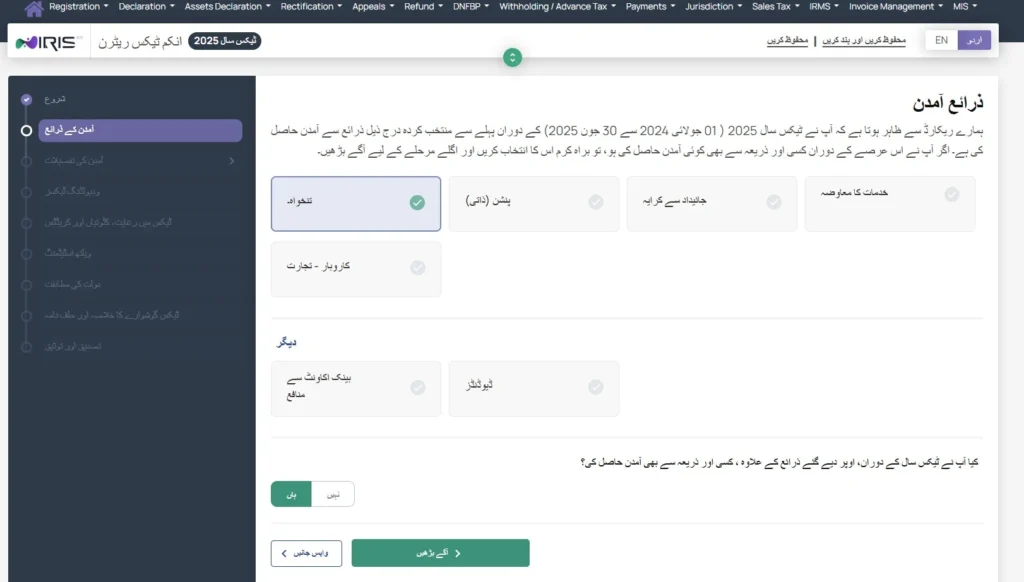
- In some cases, a new window in Urdu/English may appear for a simplified view. Make sure to click “YES” and then “proceed further” as shown in the image below.
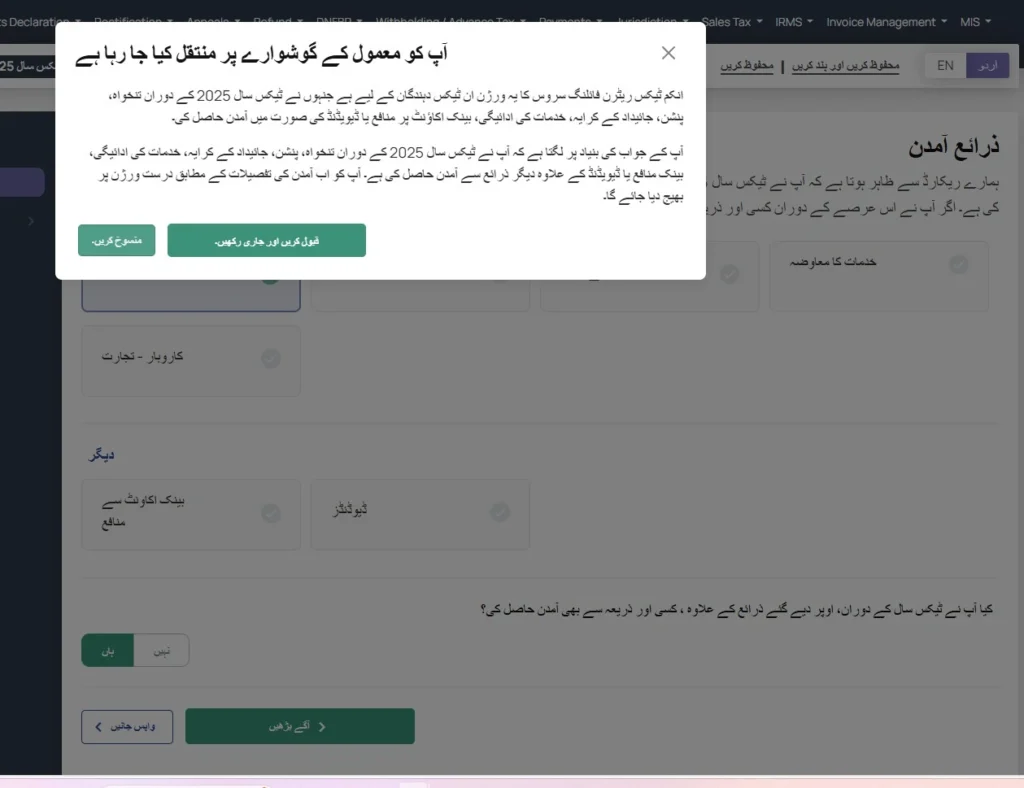
- Once you select these options, you will be acknowledged that “you are being shifted to Normal view” as shown in the image below. Click to proceed further.
Step 6: Enter Salary details
- Go to “Salary” in the “Employment Section” and enter your salary details for the whole fiscal year.
- After entering the salary, click on the “Calculate” button.
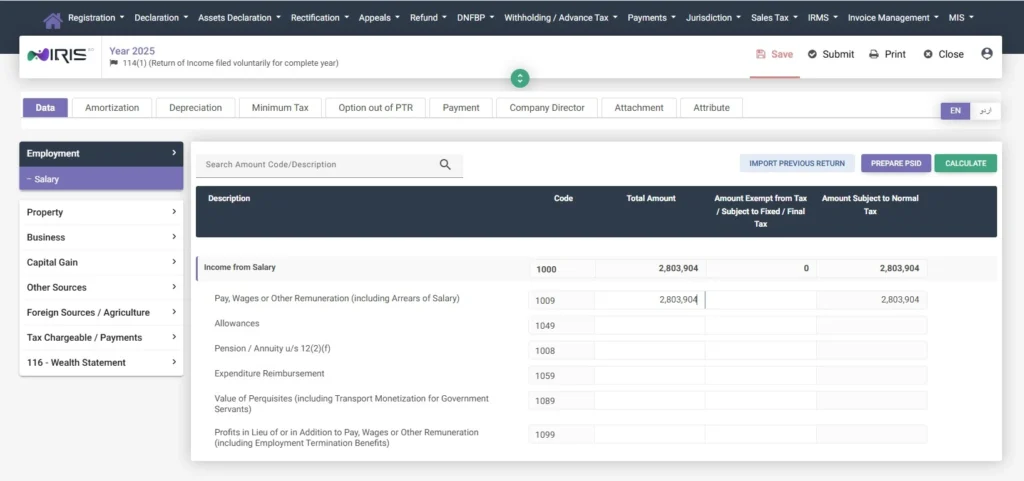
Note: If you have other sources of income like Business, Agriculture, Property Rent, or Foreign Sources, then add their details too in the relevant sections and click calculate.
Step 7: Enter Tax Details
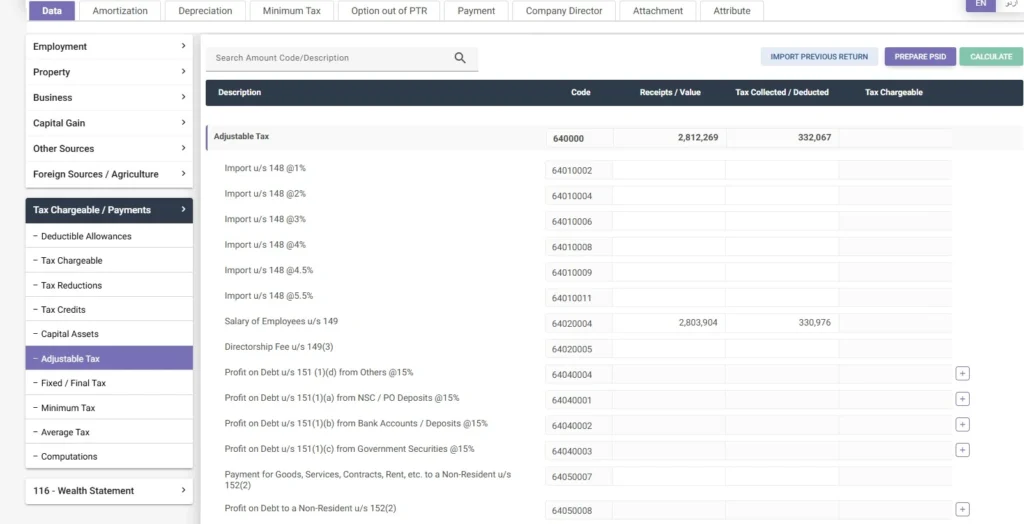
- After entering income details, go to the “Adjustable Tax” option in the “Tax Chargeable/Payments” section.
- Look for the “Salary of Employee u/s 149” in that section. You can also find the section in the search bar at the top left of the screen.
- Enter your salary income in the “Receipts/Value” column and the tax deducted value in the “Tax Collected/Deducted” column against “Salary of Employee u/s 149”, and then click the “Calculate” button.
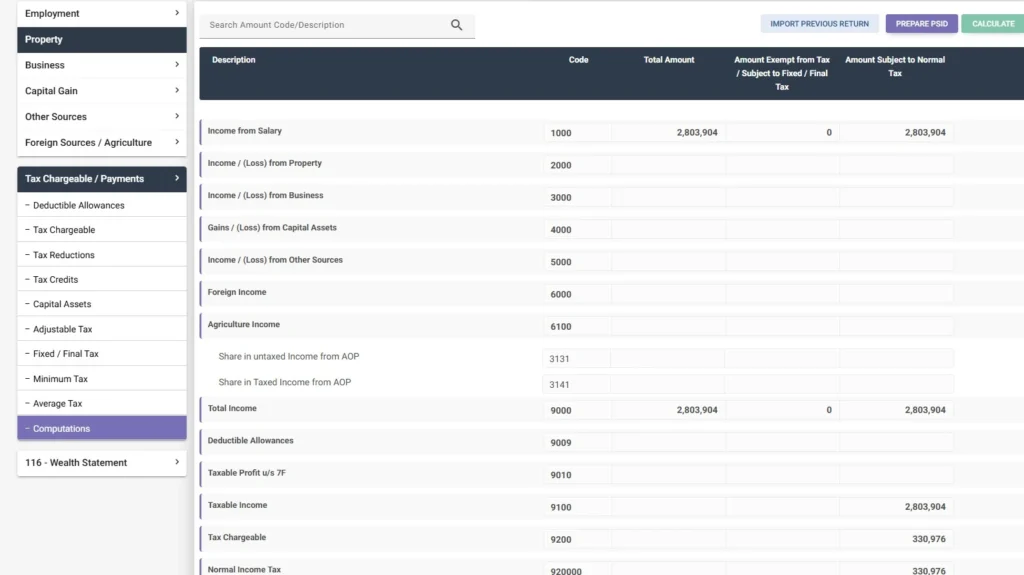
Step 8: Complete Computations
- Go to the final section of “Computations” and click on the “calculate” button.
- This section will show you your complete taxable income, W.H.T. (withholding tax) paid, Tax Chargeable, Normal Tax, and other values.
Important tip on how to file an income tax return!!!
The taxes paid are usually less or more than the actual payable taxes. The following will be the cases.
If the deducted tax is already equal to or more than the tax chargeable:
You are good to go, your admitted/demanded tax field will be zero.
If the additional tax is paid more than the salary tax:
You are safe; the extra tax paid will appear in the refundable tax in the computations section.
In the case of business individuals, if the admitted tax field has a value:
It means that tax needs to be paid. In order to pay that tax, you need to prepare the PSID and pay the tax online.
Note for Salaried Persons
- In the case of salaried individuals and government employees, the tax is usually deducted at source by the employer, so there will be no admitted income tax for the salaried class.
- You can claim the refundable tax from your employer, which is deducted in the form of property sales, purchases, banking transactions, and other activities.
Hurray! Now your tax section is complete. Now you have to complete the Wealth Statement before final submission.
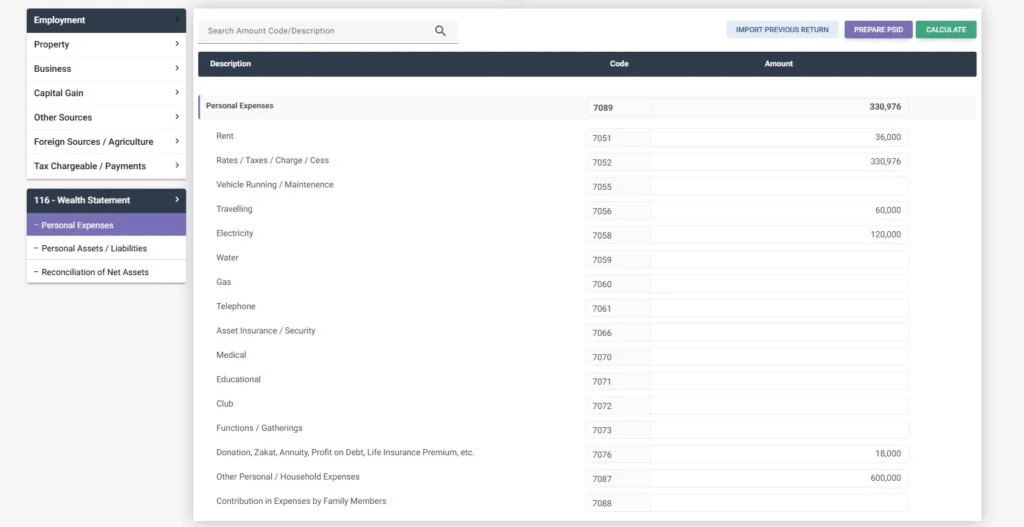
Step 9: Enter Personal Expenses
- Go to “Personal Expenses” in the “Wealth Statement” section as shown in the screenshot.
- Enter each expense in the relevant field.
- After entering all the relevant expenses, click on the calculate button.
Step 10: Enter Personal Assets/Liabilities
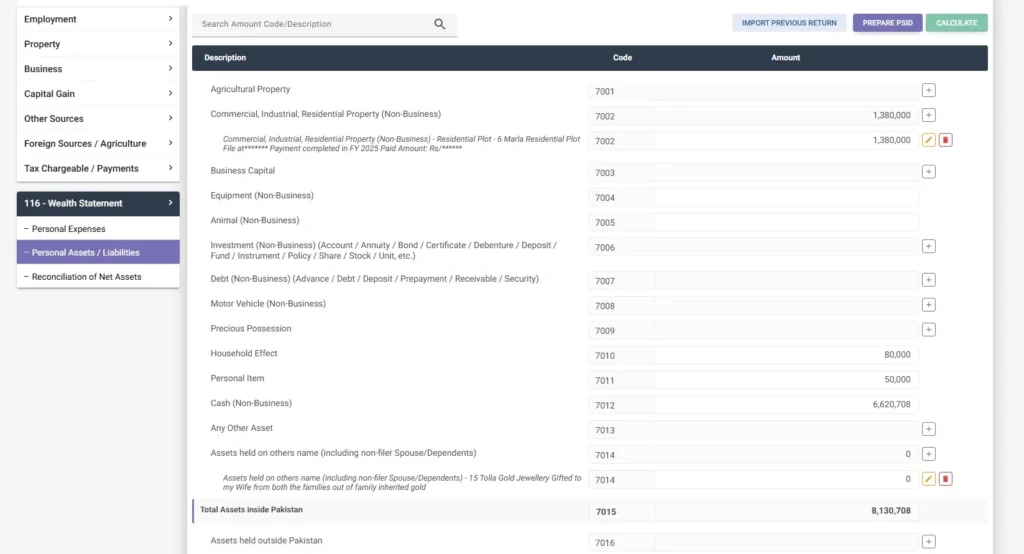
- Go to the “Personal Assets/Liabilities” section to enter your assets and liabilities details.
- In this section, enter details of all of your assets along with their value as guided in the screenshot below.
Golden Advice for entering Assets’ Value:
- For all the assets, enter the book value, i.e., value at the time of assets purchased.
- Do not change the asset value each year as per the market value. The gain will be simply added at the time of asset sale, with the difference between the sale and purchase value.
- For the old inherited non-purchased property that is transferring from generation to generation, like inherited agricultural land, keep the value zero. Gain will be added equal to the sale value at the time of sale.
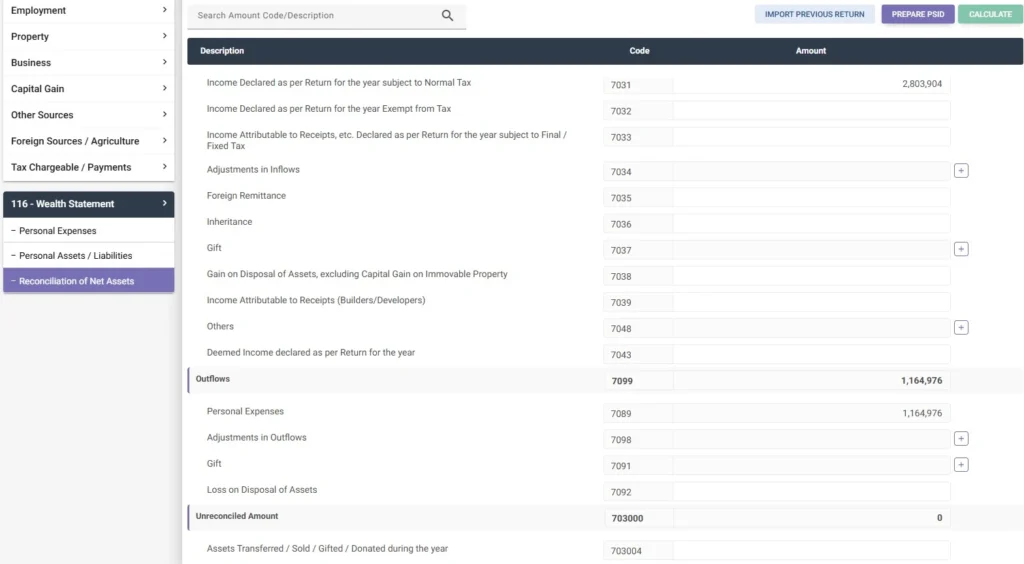
Step 11: Reconciliation of Net Assets
- Go to the “Reconciliation of Net Assets” section to enter “inflows” and “outflows”.
- For inflows:
- Enter your income in the “income declared as per return of the year subject to normal tax”
- Enter other incomes like foreign remittances, gifts, inheritance, and others, if any.
- For outflows:
- The system will automatically pick your personal expenses.
- Enter other outflows like gifts, losses, or others, if any.
- The unreconciled amount should be zero before submission of the final tax return.
How to make the unreconciled amount zero?
If you are worried that your unreconciled amount is not zero, and you are unable to submit the tax return due to this amount. Here is the solution for this issue. Just follow the simple guidelines:
- If the unreconciled amount is negative (-), that means this is the additional amount you have. Solution: Simply add that amount to the total “Cash in Hand” amount and update that in the “Personal Assets/Liabilities” section.
- If the unreconciled amount is not negative, that means this is the amount you are running short. Solution: Simply deduct (minus/subtract) that amount from the total “Cash in Hand” amount and update that in the “Personal Assets/Liabilities” section.
- After doing the above addition/subtraction of unreconciled amount from the already available total cash in hand, you need to click on the calculate button and return to the “Reconciliation of Net Assets” section after calculation. Now your unreconciled amount should be zero.
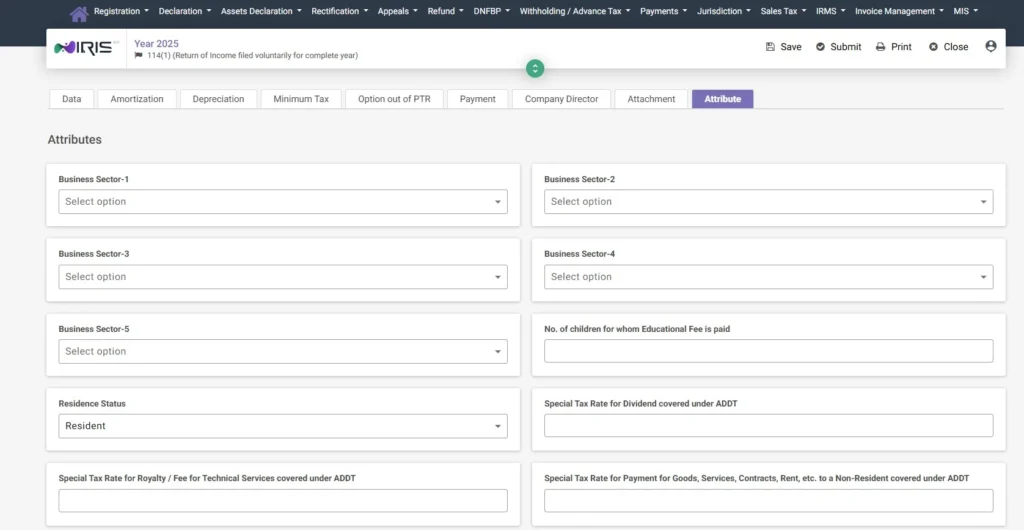
Step 12: Enter Attribute
- All the above data entries were made in the “Data Section”.
- Now move to the “Attribute” section in the extreme right.
- Enter details like resident status and others, which are relevant to you.
- Leave the irrelevant options blank.
- Click on the “Save Button” at the top of the page.
Step 13: Submit the application by entering the PIN
- After saving your data, click on the “Submit” button.
- This will prompt you to enter the 4-digit PIN to confirm the verification.
- Enter your 4-digit pin and click on the “Submit”.
- Once submitted successfully, your current fiscal year’s income tax return will appear in the “Completed Tasks” section.
Note: You can view/download/print the PDF of the submitted “income tax return” from the completed tasks section.
Last Date of Income Tax Return in Pakistan (2026)
Every year, the FBR sets a deadline for filing income tax returns. For the tax year of 2026, the last date for salaried and business individuals to file an income tax return is September 30, 2026.
Filing your return before this date is necessary. In case you miss the deadline, you might face consequences that include :
- Penalties and fines.
- Your name is being removed from the Active Taxpayers list.
- You might lose benefits like reduced withholding tax rates.
Sometimes the FBR might extend the deadline, but that’s not guaranteed. Hence, it’s better to file your income tax return before the given deadline.
Note: Don’t wait until the final week before the deadline, as the IRIS website often becomes slow due to high traffic during that time. Filing your tax return early saves you from such issues.
Frequently Asked Questions (FAQs)
Conclusion
The process of how to file an income tax return in Pakistan is now very simple using the FBR’s IRIS website. Having your required documents ready and following the step-by-step guide, the process of filing the return becomes even more streamlined and less time-consuming. Most importantly, remember to file your tax returns before the deadline to avoid penalties and fines. Maintaining the filer status keeps your name in the Active Taxpayers List, which has many benefits, such as lower tax rates. If you also want to view or download your salary slip through PIFRA registration, the process is just as simple and convenient.