
PIFRA Salary Slip – Check and Download Pay Slip Online 2026
A PIFRA salary slip is an official monthly pay statement issued to government employees in Pakistan through the PIFRA and FABS system. Once registered, you can check, download, and print it directly from your email every month without visiting the accounts office.
Every month, thousands of government employees still walk into the accounts office just to collect a piece of paper already sitting in their Gmail inbox. If that sounds familiar, this guide will fix that for good.
How to Check PIFRA Salary Slip Online?
Open your registered Gmail account, search “PIFRA,” open the email, and download the PDF. Your pay slip arrives automatically in the first week of every month.
- Open the Gmail account you registered with PIFRA
- Search “PIFRA” in the Gmail search bar
- Open the email from PIFRA
- Click the PDF attachment to open your pay slip
- Tap download to save it to your device
This is the only official way to check your slip online. No portal login is needed once you are set up.
What Is a PIFRA Salary Slip and How Does It Work?
A PIFRA pay slip is a PDF document generated through the FABS system (Financial Accounting and Budgeting System), managed by the Controller General of Accounts (CGA Pakistan). It runs on the SAP payroll system used across all federal and provincial government departments.
Your slip is generated automatically each month and sent to your registered email. You do not need to request it manually. Set it up once, and it arrives every month on its own.
The system covers all government employees including teachers, doctors, clerks, police, and pensioners across Punjab, Sindh, KPK, Balochistan, and federal departments under AGPR.
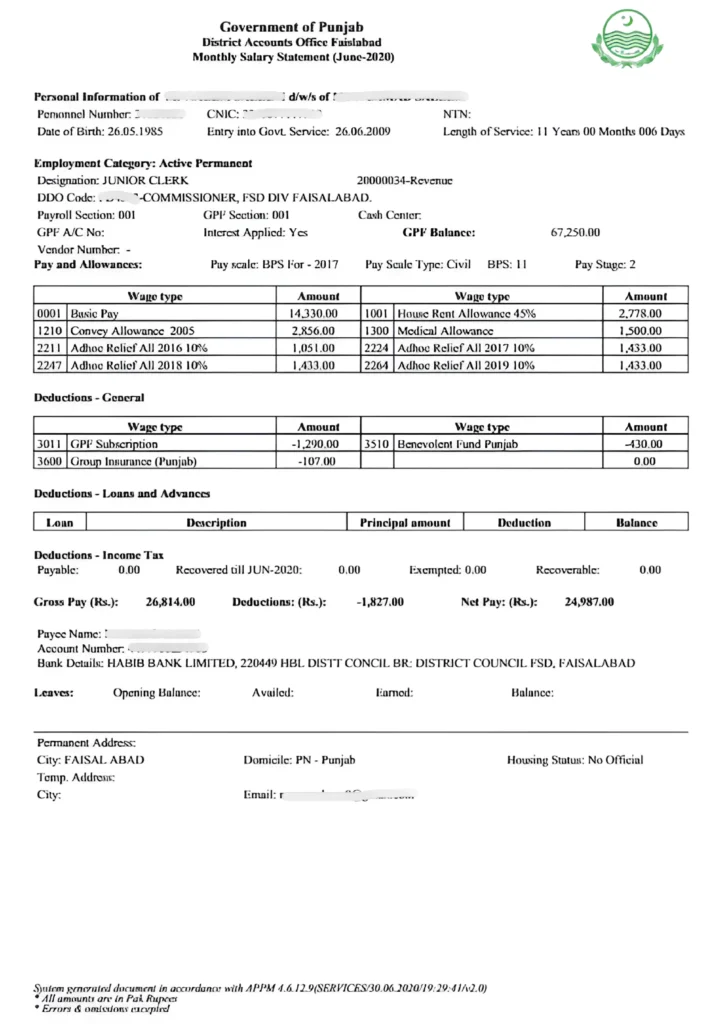
What Information Is on Your PIFRA Pay Slip?
All government employees are entitled to receive the online salary statement every month. However, they must first register with PIFRA to avail of this facility. If you are worried about the PIFRA slip for salary Registration, don’t worry, you are at the right place. We will guide you with a simple step-by-step procedure to register.
Salary Slip Components at a Glance
| Component | Details |
|---|---|
| Basic Pay | Scale-based salary, updated with 2025-26 Ad-hoc Relief |
| Allowances | House Rent, Medical, Conveyance, Ad-hoc Relief (year-wise) |
| Deductions | Income Tax, GP Fund, Provident Fund, Loan Instalments, HBA |
| Net Pay | Final amount credited to your bank after all deductions |
Personal Information
This section pulls directly from your official government record. If something here is wrong, the rest of the slip will be wrong too:
- Employee ID
- Full Name
- CNIC Number
- Department Name
- Basic Pay Scale
- Designation
- Years of Service
- Salary Month and Year
- Bank Account Details
Common Mistake: Many employees ignore errors in this section. Even a wrong CNIC digit can create problems during loan applications or tax filing. Always verify this against your official government record.
If anything looks wrong, it needs to be corrected through your DDO office. The slip reflects exactly what is in the government database.
What Is the Pay Period on a Salary Slip?
The pay period shows the exact dates your salary covers. A January slip covers 1st January to 31st January. Before assuming a month is missing, check the pay period first.
Many people panic thinking they missed a month when they actually did not. The pay period clears that up instantly.
Gross Salary and Allowances
This is your total salary before any deductions. As per the PIFRA and FABS structure, it includes:
- Basic Pay (scale-based, updated with 2025-26 Ad-hoc Relief)
- House Rent Allowance
- Medical Allowance
- Conveyance Allowance
- Ad-Hoc Relief Allowances (year-wise)
- Any department-specific allowances
The gross figure is what your department is paying you. What actually arrives in your bank is always lower. That difference comes from deductions.
Deductions and Recoveries
This is where most people have questions. Everything listed below comes out of your gross salary before anything reaches your bank:
- Income Tax (updated slabs 2025-26)
- GP Fund
- Provident Fund
- Benevolent Fund
- Accommodation Charges (only if using official housing)
- Conveyance Deductions (only if using official transport)
- Loan or Advance Instalments
- Car or Bike Advance Instalment
- HBA Instalment (House Building Advance)
If you see a deduction you do not recognize, report it to HR straight away. Unexplained deductions can go unnoticed for months and become harder to reverse.
Net Pay
Net pay is the final amount credited to your bank after all deductions. It must match what actually arrives. Any difference should be reported to HR immediately.
It could be a bank transfer issue or a calculation error inside the FABS system.
How to Download Your PIFRA Salary Slip Online?
To receive your PIFRA salary slip, you must have completed the initial setup first. If you have not done that yet, check the PIFRA registration guide. It is free and takes under five minutes.
Once set up, here is how to download it:
- Open the Gmail account used during setup
- Type “PIFRA” in the Gmail search bar
- Open the PIFRA email; it usually arrives in the first week of the month
- Click on the PDF attachment
- Tap download, it saves to your Downloads folder automatically
The Gmail search method also pulls up slips from previous months. Every slip ever delivered to that address will appear there.
I have seen people search through three different inboxes before finding the right one. If you have multiple Gmail accounts, that is almost always where the problem is.
Important Tip: Gmail sometimes moves PIFRA emails to Spam or Promotions. Always check those folders first. To fix this permanently, go to Gmail Settings, then Filters, create a filter for pifra.gov.pk, and select “Never send to Spam.” It takes 30 seconds.
If you are still not receiving anything, either the email was entered incorrectly or setup was not completed fully. Go through the setup process once more and resubmit with the correct email.
Print Your PIFRA Pay Slip
Once the PDF is downloaded, printing is simple on any device.
On a computer: Open the PDF and press Ctrl + P on Windows or Cmd + P on Mac. Select your printer and click Print.
On a phone: Open the PDF in any viewer app. Tap the share or print icon. If a printer is connected to your network, it appears directly. If not, send it to a nearby shop via WhatsApp.
No printer at home: Save the PDF to a USB drive and take it to any computer shop. They handle government documents all the time, and it takes two minutes.
Why Does Your Pay Slip Matter Beyond Just Salary?
A PIFRA salary slip is not just a monthly pay record. It is one of the most widely accepted official financial documents in Pakistan. Commonly used by government employees across Pakistan for:
- Bank loan applications: Banks require the last 3 to 6 months of slips to verify income
- Visa and embassy requirements: Proof of employment and income for travel visas
- Income tax return filing: Salary figures and deductions needed for accurate tax filing
- Bank account opening: Required by many banks for government employee accounts
- HBA and conveyance advance applications: Required by banks for processing these schemes
- Service record and HR file: Used for departmental and personal records
Because these slips are generated directly through FABS and the SAP payroll system under CGA Pakistan, banks and government offices accept them without additional verification.
PIFRA Salary Slip Not Arriving – Causes and Solutions
Most of the time, it comes down to one of three things.
Wrong email entered: Even one incorrect letter sends every slip elsewhere. Search “PIFRA” in each of your Gmail accounts to find where it is going. The first time I dealt with this, I spent 20 minutes thinking PIFRA was broken. Turns out the slip had been going to a typo email address for months.
Multiple Gmail accounts: If you have two or three accounts on your phone, you might be checking the wrong inbox. Go through all of them before assuming there is a problem.
Setup not completed: Some people start but do not finish. The system sends nothing until everything is fully confirmed. Go back through the setup steps and complete it properly.
Common Mistake: Most people assume the system is broken when they do not receive their slip. Nine out of ten times, it is either a wrong email address or an incomplete setup.
Pay Slip Delivery Delay Due to FABS System Maintenance
Sometimes the slip is late, and nothing is wrong on your side. When FABS undergoes maintenance or updates, salary data gets processed late. Everyone in that batch gets delayed. There is nothing to do except wait. It arrives once the system is back online.
Fixing Wrong Information on Pay Slip
For personal details like wrong name, incorrect CNIC, or outdated designation: contact your DDO office and ask them to correct it in the departmental record. Your next slip will reflect the right details automatically.
Most people ignore small errors thinking it does not matter. I have seen a wrong CNIC digit cause a loan application to be rejected at the bank. It is worth fixing early.
For salary calculation errors like incorrect allowances or unexpected deductions, report it to your department HR immediately and contact PIFRA support if the issue is not resolved.
PIFRA Website Not Opening
Check your internet connection first. If that is fine, the portal is likely under scheduled maintenance. This usually resolves within a few hours. If it stays down for multiple days, reach out to PIFRA support directly.
What is a DDO Pay Slip and How is it Different?
A DDO (Drawing and Disbursing Officer) manages salary payments for an entire government department. Unlike a regular employee slip, a DDO can view pay data for all employees in that department, not just one person.
DDOs also have access to department budget reports through PIFRA, and anyone who needs a breakdown of those numbers can view DDO BER details to see exactly how it works.
Government Departments That Can Access PIFRA Salary Slips
With PIFRA’s integration across federal and provincial systems, nearly all government employees in Pakistan can now check their pay slip online. Here is how it breaks down by department:
FABS Pay Slip
FABS powers slip generation for the education department employees. Teachers, educators, and school staff all access theirs through the same portal using the same process.
PIFRA Salary – Punjab Government
All Punjab government employees access their slip using the province code “P” during setup.
PIFRA Salary – AG Sindh
Sindh government employees use the province code “S” to access their monthly slip online.
AGPR Salary Slip
Federal government employees under AGPR (Accountant General Pakistan Revenues) register using code “F” to receive their monthly slip.
Department of ML&C Salary Slip
Military Land and Cantonments department employees can check their slips through the standard portal process.
Pension Slip – PIFRA
Retired government employees receive their monthly pension slip through the same system. The process is identical. The system identifies pensioners automatically based on the personnel number used during setup. If you want to estimate your pension amount, you can also use a pension calculator for a detailed breakdown.
Frequently Asked Questions About PIFRA Salary Slip
Conclusion
Getting your PIFRA salary slip via email every month removes a lot of unnecessary friction. No more trips to the accounts office. Register once, and the system handles everything automatically, month after month.
If you have not set it up yet, the complete guide with screenshots is available on this site. It takes under five minutes and works on any phone or computer.
Once done, set up a Gmail filter for pifra.gov.pk so your slips never land in spam. That one step solves the most common complaint government employees have about the whole system.